This website uses Cookies. Click Accept to agree to our website's cookie use as described in our Privacy Policy. Click Preferences to customize your cookie settings.

- The Google for Education Community Platform
- Primary and Secondary Education Communities
- ELP Admin Community
- Discussions
- Peer-Peer Topics
- Google Cloud Directory Sync with an Active Directo...
Options
- Subscribe to RSS Feed
- Mark Topic as New
- Mark Topic as Read
- Float this Topic for Current User
- Bookmark
- Subscribe
- Mute
- Printer Friendly Page

Options
- Mark as New
- Bookmark
- Subscribe
- Mute
- Subscribe to RSS Feed
- Permalink
- Report Inappropriate Content
05-07-2024 06:34 AM - edited 05-07-2024 06:35 AM
Hi all,
We have been sailing along just fine for years with our existing setup of a normal AD account and scheduled task that calls a .bat file to do our hourly sync from a Windows server.
Now however, we are trying to reduce and remove normal style service accounts in our division and transition anything that runs scheduled tasks to gMSA accounts for improved security.
The issue is of course that with GCDS the scheduled task needs to be the same user as the one that saves the config as its encrypted. So even though I have my scheduled task transitioned to running under the new gMSA account, it fails as the config was created and saved by the old AD user service account. So my issue now is I need to re-save and authorize a new config as under the gMSA user.
However with gMSA accounts you cannot use them to login interactively on the server, though I was able to use PSEXEC to start and open the GCDS config-manager software as the gSMA user, my issue now is clicking the "Authorize Now" button.
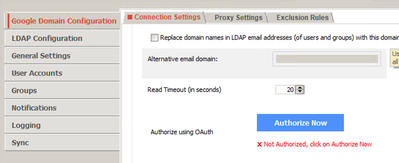
Normally of course it opens a browser window where you sign in and grant Oauth access. But no browser opens, nor even if I open Chrome via PSEXEC, it doesn't launch a new tab.
So the TL;DR:
1. Has anyone successfully been able to migrate to using a gMSA AD service account? How?
2. Alternatively any creative ideas to get the URL that is behind that "Authorize now" button? I could then just paste it into a browser session that I start as the gMSA user.
Cloud Systems Analyst
Elk Island Public School District
Alberta, Canada
Elk Island Public School District
Alberta, Canada
Solved! Go to Solution.
Topics:
Reply
1 ACCEPTED SOLUTION
Options
- Mark as New
- Bookmark
- Subscribe
- Mute
- Subscribe to RSS Feed
- Permalink
- Report Inappropriate Content
05-07-2024 09:26 AM
Isn't that so funny, sometimes you just need to chat about a problem and solution appears 😂.
Figured it out completely randomly. For anyone else who is trying to do this:
When you click "Authorize now" a log entry gets generated in the file "output.log" that is located in the GCDS installation directory. That line contains the unique URL you need to visit to authorize in Google Workspace portal.
Using PSEXEC launch Chrome or your browser of choice installed so that its running as the gMSA user account and visit the URL and authorize. Then you can save your XML config and your scheduled task (created using the same gMSA account) will work!
Cloud Systems Analyst
Elk Island Public School District
Alberta, Canada
Elk Island Public School District
Alberta, Canada
Reply
5 REPLIES 5

Options
- Mark as New
- Bookmark
- Subscribe
- Mute
- Subscribe to RSS Feed
- Permalink
- Report Inappropriate Content
05-07-2024 06:44 AM
I'm thinking that GCDS needs to save those credentials somewhere.
So perhaps you could do the auth some other way, and save the credentials in the place GCDS expects them to be. Ohhh, right, it's actually inside the xml itself, encrypted. That might be tricky.
I'm guessing Google is not going to tell you how it's encrypted, for fear of people then using that to decrypt such files. If you already know, then you can perhaps do it. Still need to know what data to put there, of course.
The (GSPS) Password sync uses a regular .P12 file for the Google service account access, but you do have to load it inside the software.
--
https://wheretofind.me/@NoSubstitute
https://wheretofind.me/@NoSubstitute
Options
- Mark as New
- Bookmark
- Subscribe
- Mute
- Subscribe to RSS Feed
- Permalink
- Report Inappropriate Content
05-07-2024 06:55 AM
Thanks Kim.
Well I believe the local xml encryption is not my showstopper anymore, as I was able to open the config-manager application under the gMSA users context. Once I can save a working config from there I have no doubts the scheduled task will work.
Its just getting that unique URL from that "authorize now" button thats blocking me. It may not be doable but I will keep thinking of creative ways to capture that URL and hope someone smarter than me has figured it out 🙂
Cloud Systems Analyst
Elk Island Public School District
Alberta, Canada
Elk Island Public School District
Alberta, Canada
Options
- Mark as New
- Bookmark
- Subscribe
- Mute
- Subscribe to RSS Feed
- Permalink
- Report Inappropriate Content
05-07-2024 07:05 AM
Well, I think it'll be hard to skip the software expecting to be able to complete the process inside the actual GCDS and then again wait for you to exit and save the xml.
--
https://wheretofind.me/@NoSubstitute
https://wheretofind.me/@NoSubstitute
Options
- Mark as New
- Bookmark
- Subscribe
- Mute
- Subscribe to RSS Feed
- Permalink
- Report Inappropriate Content
05-07-2024 09:26 AM
Isn't that so funny, sometimes you just need to chat about a problem and solution appears 😂.
Figured it out completely randomly. For anyone else who is trying to do this:
When you click "Authorize now" a log entry gets generated in the file "output.log" that is located in the GCDS installation directory. That line contains the unique URL you need to visit to authorize in Google Workspace portal.
Using PSEXEC launch Chrome or your browser of choice installed so that its running as the gMSA user account and visit the URL and authorize. Then you can save your XML config and your scheduled task (created using the same gMSA account) will work!
Cloud Systems Analyst
Elk Island Public School District
Alberta, Canada
Elk Island Public School District
Alberta, Canada
Reply
Options
- Mark as New
- Bookmark
- Subscribe
- Mute
- Subscribe to RSS Feed
- Permalink
- Report Inappropriate Content
05-07-2024 09:34 AM
Awesome! Great find!
--
https://wheretofind.me/@NoSubstitute
https://wheretofind.me/@NoSubstitute

Subscribe
Related Content
- How to hide certain staff info from the contact directory in Peer-Peer Topics
- (Limited) integration between Workspace accounts in Peer-Peer Topics
- There is now a setting to (dis)allow pronouns in Profile Editing in Peer-Peer Topics
- GCDS started failing with precondition failure error in logs in Peer-Peer Topics
- Disable Global Directory for an OU in Peer-Peer Topics
