This website uses Cookies. Click Accept to agree to our website's cookie use as described in our Privacy Policy. Click Preferences to customize your cookie settings.

- The Google for Education Community Platform
- Primary and Secondary Education Communities
- ELP Admin Community
- Discussions
- Peer-Peer Topics
- Calendario Google educativo (y sus imagenes)
Options
- Subscribe to RSS Feed
- Mark Topic as New
- Mark Topic as Read
- Float this Topic for Current User
- Bookmark
- Subscribe
- Mute
- Printer Friendly Page

Options
- Mark as New
- Bookmark
- Subscribe
- Mute
- Subscribe to RSS Feed
- Permalink
- Report Inappropriate Content
04-22-2024 12:12 PM - edited 04-24-2024 09:40 AM
Saludos!
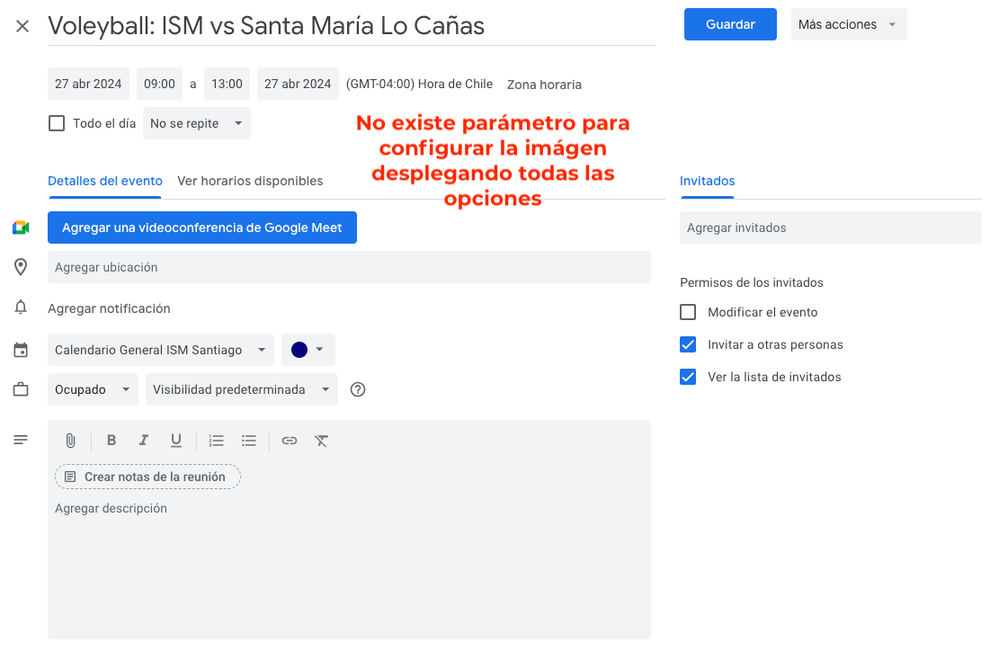
No es primera vez que ocurre y la verdad desconozco si existe alguna opción para modificar/quitar/corregir/seleccionar una imágen apropiada en el calendario de Google para nuestra unidad educativa.
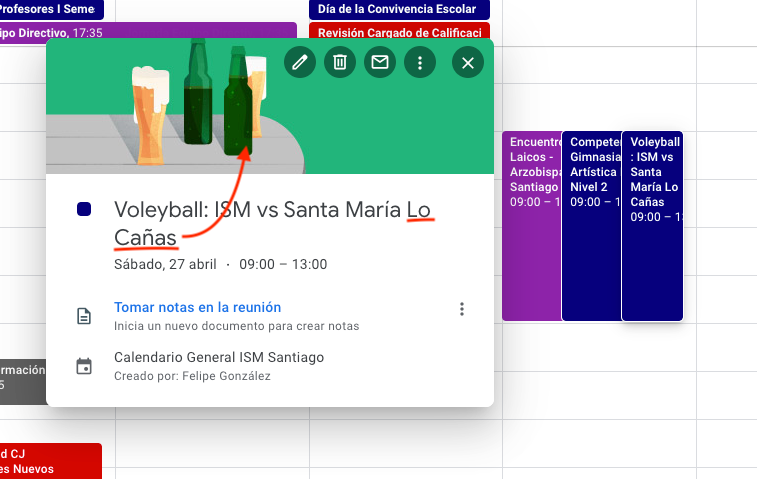
Sub entiendo que Google interpreta el título de los eventos y les incluye una imagen cuando encuentra una relación. pero ocurre que en ocasiones la interpretación es incorrecta y la verdad no se ve para nada bien.
Les adjunto una imagen donde nuestro colegio participa de un campeonato de Voley y en la próxima fecha se enfrentan con un colegio cuyo nombre finaliza en "Lo Cañas" (nombre de la zona donde se encuentra ubicado) y Google lo interpreta como fiesta, asumiendo que la palabra mencionada hace referencia a el tipo de vaso/medida del alcohol, incluyendo una imagen no apropiada para el contexto escolar y menos deportivo.
Leo sus comentarios / sugerencias.
PD: Se descarta la opción de borrar el nombre del colegio contrincante.
Gracias,
Feliz Día de la Tierra
Solved! Go to Solution.
Topics:
Reply
1 ACCEPTED SOLUTION

Options
- Mark as New
- Bookmark
- Subscribe
- Mute
- Subscribe to RSS Feed
- Permalink
- Report Inappropriate Content
04-23-2024 10:25 AM
The setting to toggle on/off "Show Event Illustrations" is available in iOS version of Google Calendar only. Unfortunately, the only workaround that I am aware of is to place a number after the title and it will not add the image. Hopefully, this option will make its way to other OS.
Reply
4 REPLIES 4
Options
- Mark as New
- Bookmark
- Subscribe
- Mute
- Subscribe to RSS Feed
- Permalink
- Report Inappropriate Content
04-23-2024 10:25 AM
The setting to toggle on/off "Show Event Illustrations" is available in iOS version of Google Calendar only. Unfortunately, the only workaround that I am aware of is to place a number after the title and it will not add the image. Hopefully, this option will make its way to other OS.
Reply
Options
- Mark as New
- Bookmark
- Subscribe
- Mute
- Subscribe to RSS Feed
- Permalink
- Report Inappropriate Content
04-25-2024 01:42 PM
probé reemplazando el espacio por un "_" entre "Lo Cañas" y funcionó, gracias por el Tips

Options
- Mark as New
- Bookmark
- Subscribe
- Mute
- Subscribe to RSS Feed
- Permalink
- Report Inappropriate Content
04-23-2024 10:50 PM
@YERKO do make sure you give this as feedback inside the Calendar app/service too, so the Calendar team sees your concern.
--
https://wheretofind.me/@NoSubstitute
https://wheretofind.me/@NoSubstitute
Reply
Options
- Mark as New
- Bookmark
- Subscribe
- Mute
- Subscribe to RSS Feed
- Permalink
- Report Inappropriate Content
04-25-2024 02:03 PM
@YERKO Good work! I tried adding a space afterwards when I tested this and it did not work. Glad you found that adding a character between the words was a good solution.

Subscribe
