This website uses Cookies. Click Accept to agree to our website's cookie use as described in our Privacy Policy. Click Preferences to customize your cookie settings.

- The Google for Education Community Platform
- Primary and Secondary Education Communities
- ELP Admin Community
- Discussions
- Peer-Peer Topics
- Re: Unconfigured third-party apps - New settings a...
Options
- Subscribe to RSS Feed
- Mark Topic as New
- Mark Topic as Read
- Float this Topic for Current User
- Bookmark
- Subscribe
- Mute
- Printer Friendly Page

Options
- Mark as New
- Bookmark
- Subscribe
- Mute
- Subscribe to RSS Feed
- Permalink
- Report Inappropriate Content
06-21-2023 05:43 AM - edited 10-25-2023 07:26 AM
(Unpinning this next week, as it has already rolled out. We may still come back to it in the future.)
So, despite the deadline being "moved to October", you need to fix your settings NOW!
The default settings are in effect, and say that Under-18 can't use third-party apps!
Here comes a bunch of images from my testing.
At the top of the admin console we can now see the new date.

There is also a new card on the front page.

If you click the Get started button new page opens the walk-through process of setting it up.

First you get to select the default setting for unconfigured (unknown or known) apps/services.
My recommendation has always been to keep the default "block all".

Then you are offered the opportunity to confirm and/or change the access of apps & services already in use.
You will have to allow/trust the client_ids of the third-party (external) apps & services that you wish your users can use with their Workspace accounts. Luckily those currently used are already listed (can be several thousands if you have many users), and you can easily click and change their access. For the future you will have to gather the client_id on the first run of a new service (it will be denied, with error details containing the client_id) and add it as trusted.
After finding those apps & services where you already have a formal, preferably written, decision that people should use, stop touching the list! Yes, you will have some whiners complaining about not being able to use TikTok with their work account, but that's their problem.
Any other apps/services that are to be allowed must go through a proper vetting process with a documented decision on whether to allow it or not. Anything else will make it untenable and most likely illegal. Yeah, I say "illegal". Just because you didn't block everything before doesn't mean that not doing that was legal.

Are you really sure? 🙂

Ta daaa!
Now you are prepared for the setting going into effect (in October, if we are to believe the first notification).

If you go to the API Access Control page manually, you can see there's a new card for pending reviews.

And the API Control Settings page display your new settings.

When a user tries to use a new/untrusted service they will be denied, with the opportunity to send a request for access.

This is what the confirmation of the request looks like.

"In the olden days" the user had to click the error details and send you the client_id, so you could add it manually, but today the request is automatically added to the new Pending review page, where you can easily click to allow it or not.

Nice, isn't it!?
However, a definite heads-up is warranted.
I have tested it, and my Under-18 test user is already being blocked... just saying... so perhaps it may come into effect before October. That's the user I created the SignIn and Request images with.
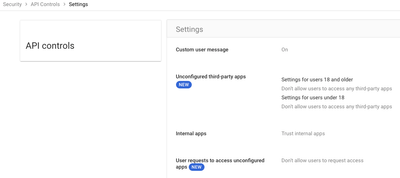
Update 2023-10-11 - My settings. Disabled Requests, and, of course, blocking everything for everyone.
--
https://wheretofind.me/@NoSubstitute
https://wheretofind.me/@NoSubstitute
Solved! Go to Solution.
Topics:
- Topics:
-
Security
Reply
4 ACCEPTED SOLUTIONS
Options
- Mark as New
- Bookmark
- Subscribe
- Mute
- Subscribe to RSS Feed
- Permalink
- Report Inappropriate Content
06-21-2023 05:47 AM
If the same user tries to access the same app again, they are of course still denied, and if they send a new request, it will say a request has already been sent.
--
https://wheretofind.me/@NoSubstitute
https://wheretofind.me/@NoSubstitute
Options
- Mark as New
- Bookmark
- Subscribe
- Mute
- Subscribe to RSS Feed
- Permalink
- Report Inappropriate Content
06-21-2023 05:52 AM - edited 06-21-2023 05:52 AM
Oh, worth noting.
Staff (or really anyone not in an Under-18 OU) can't request access with that same method.
It's only available for Under-18.
--
https://wheretofind.me/@NoSubstitute
https://wheretofind.me/@NoSubstitute
Reply
Options
- Mark as New
- Bookmark
- Subscribe
- Mute
- Subscribe to RSS Feed
- Permalink
- Report Inappropriate Content
06-29-2023 03:17 AM
Everyone should give feedback that we want TWO things here.
- The ability to turn OFF the request feature completely! I don't want requests from students.
- The ability to turn ON the request feature for Over-18. Yes, yes, I know, it's much better to have a completely separate Approval Process for this (that's what I recommend), but this should (as always) be an admin choice, and not hard-coded by Google!
.
--
https://wheretofind.me/@NoSubstitute
https://wheretofind.me/@NoSubstitute
Reply
Options
- Mark as New
- Bookmark
- Subscribe
- Mute
- Subscribe to RSS Feed
- Permalink
- Report Inappropriate Content
10-10-2023 11:52 PM
Update 2023-10-11 - My settings. Disabled Requests, and, of course, blocking everything for everyone.

--
https://wheretofind.me/@NoSubstitute
https://wheretofind.me/@NoSubstitute
Reply
53 REPLIES 53
Options
- Mark as New
- Bookmark
- Subscribe
- Mute
- Subscribe to RSS Feed
- Permalink
- Report Inappropriate Content
06-21-2023 05:47 AM
If the same user tries to access the same app again, they are of course still denied, and if they send a new request, it will say a request has already been sent.
--
https://wheretofind.me/@NoSubstitute
https://wheretofind.me/@NoSubstitute
Options
- Mark as New
- Bookmark
- Subscribe
- Mute
- Subscribe to RSS Feed
- Permalink
- Report Inappropriate Content
06-21-2023 05:52 AM - edited 06-21-2023 05:52 AM
Oh, worth noting.
Staff (or really anyone not in an Under-18 OU) can't request access with that same method.
It's only available for Under-18.
--
https://wheretofind.me/@NoSubstitute
https://wheretofind.me/@NoSubstitute
Reply
Options
- Mark as New
- Bookmark
- Subscribe
- Mute
- Subscribe to RSS Feed
- Permalink
- Report Inappropriate Content
06-29-2023 03:17 AM
Everyone should give feedback that we want TWO things here.
- The ability to turn OFF the request feature completely! I don't want requests from students.
- The ability to turn ON the request feature for Over-18. Yes, yes, I know, it's much better to have a completely separate Approval Process for this (that's what I recommend), but this should (as always) be an admin choice, and not hard-coded by Google!
.
--
https://wheretofind.me/@NoSubstitute
https://wheretofind.me/@NoSubstitute
Reply

Options
- Mark as New
- Bookmark
- Subscribe
- Mute
- Subscribe to RSS Feed
- Permalink
- Report Inappropriate Content
06-28-2023 01:54 PM - edited 06-28-2023 01:57 PM
I noticed this today. It would have been nice to get heads up from support. Also, when I run the wizard and look at the apps listed I only see 180 apps. This is in contrast to the 1000 apps accessed by users on my domain in the API section. I am not convinced that these 180 represent anything, but the apps that I have already "configured" . I think they need to be "confirmed" too by October?
Hope this makes sense.
Options
- Mark as New
- Bookmark
- Subscribe
- Mute
- Subscribe to RSS Feed
- Permalink
- Report Inappropriate Content
06-29-2023 03:22 AM - edited 06-29-2023 03:22 AM
The guide can be ignored. It's just there to help ease those who never used API Access Control into the process.
So the "confirmation" only makes sure you have configured the necessary apps for OUs Under-18... while I keep saying this entire separate-Over/Under-18 thing was completely unnecessary.
What they should have done was just force change the setting to Block everything, and just tell everyone that they need to do the necessary work before the deadline.
NOBODY should be running with the setting Allow everything, regardless of user age.
--
https://wheretofind.me/@NoSubstitute
https://wheretofind.me/@NoSubstitute

Options
- Mark as New
- Bookmark
- Subscribe
- Mute
- Subscribe to RSS Feed
- Permalink
- Report Inappropriate Content
06-29-2023 11:11 AM
I am curious about what Google services people have restricted/unrestricted. I would like to set some of the apps to only be able to use Google sign-on (and maybe something else?), while others I want trusted to have access to everything. If I am not mistaken, that is the difference between "Limited" and "Trust".
Options
- Mark as New
- Bookmark
- Subscribe
- Mute
- Subscribe to RSS Feed
- Permalink
- Report Inappropriate Content
06-29-2023 12:42 PM
Exactly!
I have always run 100% Restricted, but I will actually switch the Google Sign-in service to Unrestricted, after confirming that my thoughts are correct.
Then perhaps I can set a new service to Limited and it'll only be allowed to access the unrestricted Google sign-in, even if it wants to use other restricted services.
That's what I have to test and verify before changing it globally.
--
https://wheretofind.me/@NoSubstitute
https://wheretofind.me/@NoSubstitute
Reply
Options
- Mark as New
- Bookmark
- Subscribe
- Mute
- Subscribe to RSS Feed
- Permalink
- Report Inappropriate Content
06-29-2023 03:12 PM
Thanks Kim! I think that makes a lot of sense, on mine there are a bunch that have 0 users using them, so I figure I can set those as restricted and wait until the point where someone is blocked to let me know. I am using "the forcing students" as the reason to push it for everyone and really tighten up all the extensions that staff were loading. Let us know if you can verify the limited theory, or if anyone else can comfirm.
Reply
Options
- Mark as New
- Bookmark
- Subscribe
- Mute
- Subscribe to RSS Feed
- Permalink
- Report Inappropriate Content
07-06-2023 01:11 PM
Id be interested in the outcomes of your experiments.
Options
- Mark as New
- Bookmark
- Subscribe
- Mute
- Subscribe to RSS Feed
- Permalink
- Report Inappropriate Content
06-30-2023 04:48 AM
This new setting is also discussed in this separate thread.
--
https://wheretofind.me/@NoSubstitute
https://wheretofind.me/@NoSubstitute

Options
- Mark as New
- Bookmark
- Subscribe
- Mute
- Subscribe to RSS Feed
- Permalink
- Report Inappropriate Content
07-06-2023 09:38 AM
It's kind of confusing to look at some of these because I'm sure I have more people using some of these apps than what Google shows. I wonder what criteria it goes by to decide an app has a unique user.
Options
- Mark as New
- Bookmark
- Subscribe
- Mute
- Subscribe to RSS Feed
- Permalink
- Report Inappropriate Content
07-06-2023 09:42 AM
They actually have to log into it using their school account.
Not use username/password but click the Sign-in with Google button.
--
https://wheretofind.me/@NoSubstitute
https://wheretofind.me/@NoSubstitute
Options
- Mark as New
- Bookmark
- Subscribe
- Mute
- Subscribe to RSS Feed
- Permalink
- Report Inappropriate Content
07-07-2023 02:53 AM
First test running a tool as Limited only, but where the tool really wants to use more than that.
I use Crop Sheet since that is my favourite tool for Sheets.
Crop Sheet is allowed as a Marketplace app, and as such set as Trusted by Marketplace.
When I set it to Blocked in my test-ou, it stops working. As expected that overrides the general and inherited setting of Trusted.
But setting it as Limited does not actually limit anything. Crop Sheet is still allowed to do everything.
So for my next test I need to find something that isn't already allowed in Marketplace, but wants to use more than just login-information. Anyone have any suggestions for non-Marketplace tools that wants to access Workspace services?
Ahh, perhaps some of the graphics editors! they usually want to access Drive when logging in!
I'll get back with results from testing that.
--
https://wheretofind.me/@NoSubstitute
https://wheretofind.me/@NoSubstitute
Reply

Options
- Mark as New
- Bookmark
- Subscribe
- Mute
- Subscribe to RSS Feed
- Permalink
- Report Inappropriate Content
07-11-2023 05:52 AM - edited 07-11-2023 05:52 AM
There has been a few times that there was an API access that we reviewed, it was not Google Certified, but was necessary for what it was needed for. On those few Apps I set the access to Limited, but I was always curious as to what it really limited.
--
Brodie McBeath - Sys Admin - Joshua ISD (Tx)
Brodie McBeath - Sys Admin - Joshua ISD (Tx)
Options
- Mark as New
- Bookmark
- Subscribe
- Mute
- Subscribe to RSS Feed
- Permalink
- Report Inappropriate Content
07-11-2023 05:57 AM
Limited means it can access all Google Services that are set to Unrestricted here.
--
https://wheretofind.me/@NoSubstitute
https://wheretofind.me/@NoSubstitute
Reply
Options
- Mark as New
- Bookmark
- Subscribe
- Mute
- Subscribe to RSS Feed
- Permalink
- Report Inappropriate Content
07-11-2023 05:58 AM
Ah, thank you sir!
--
Brodie McBeath - Sys Admin - Joshua ISD (Tx)
Brodie McBeath - Sys Admin - Joshua ISD (Tx)
Options
- Mark as New
- Bookmark
- Subscribe
- Mute
- Subscribe to RSS Feed
- Permalink
- Report Inappropriate Content
07-11-2023 05:57 AM
Kim, are you aware of a way to see who the Access Request came from? When I open the Request Screen and click on the request, I do see the OU in which the requestor is in, but not the name of the user. I suppose its not imperative, but its nice to know.
--
Brodie McBeath - Sys Admin - Joshua ISD (Tx)
Brodie McBeath - Sys Admin - Joshua ISD (Tx)
Options
- Mark as New
- Bookmark
- Subscribe
- Mute
- Subscribe to RSS Feed
- Permalink
- Report Inappropriate Content
07-11-2023 05:58 AM - edited 07-11-2023 05:58 AM
Nope, I don't know. I haven't tested.
It should definitely be included in the request, so you should give that as feedback.
--
https://wheretofind.me/@NoSubstitute
https://wheretofind.me/@NoSubstitute
Reply

Options
- Mark as New
- Bookmark
- Subscribe
- Mute
- Subscribe to RSS Feed
- Permalink
- Report Inappropriate Content
07-11-2023 01:01 PM
You can see who requested what by doing this:

My search shows almost exactly the same list.
Reply

Options
- Mark as New
- Bookmark
- Subscribe
- Mute
- Subscribe to RSS Feed
- Permalink
- Report Inappropriate Content
07-17-2023 09:45 AM
Just to confirm... I am going through all of our apps and it looks like our under 18 OUs cannot access any listed as "not configured", which is perfect. However, as I am going through the "configured" apps, I am finding some that students should not have access to. Is my only option on these already configured apps to BLOCK the app for the under 18 OU's? (I am focusing on the under 18 OUs for now). Thanks!
Options
- Mark as New
- Bookmark
- Subscribe
- Mute
- Subscribe to RSS Feed
- Permalink
- Report Inappropriate Content
07-17-2023 10:02 AM
Either block for students OU or change to only Trust for staff OU.
--
https://wheretofind.me/@NoSubstitute
https://wheretofind.me/@NoSubstitute
Reply
Options
- Mark as New
- Bookmark
- Subscribe
- Mute
- Subscribe to RSS Feed
- Permalink
- Report Inappropriate Content
07-17-2023 11:14 AM
Thanks! Also, is there a way I am missing to look up the name and maybe a URLfor an app based on App ID? I have been putting the app ID into a google search, and that seems to work, but I am wondering if there is an easier way I am not seeing.
Options
- Mark as New
- Bookmark
- Subscribe
- Mute
- Subscribe to RSS Feed
- Permalink
- Report Inappropriate Content
07-17-2023 01:02 PM
Yes, start the Add an app process, but don't finish it. After supplying the ID, it will reveal the service, sometimes. 🙄
Other times, the name is useless.
ChatGPT is called "Universe". Completely irrelevant.
--
https://wheretofind.me/@NoSubstitute
https://wheretofind.me/@NoSubstitute

Options
- Mark as New
- Bookmark
- Subscribe
- Mute
- Subscribe to RSS Feed
- Permalink
- Report Inappropriate Content
07-19-2023 12:43 PM
Does anyone have any information on what it looks like when an app changes what services / scopes it is requesting access to?
For example, lets say I review an app that needs drive access because it wants to store files. This is an app that we pay for and they have sign or DPA so I mark the app as "trusted." What happens if that app then requests access to another service? Will that access be granted because it was trusted before?
Reply
Options
- Mark as New
- Bookmark
- Subscribe
- Mute
- Subscribe to RSS Feed
- Permalink
- Report Inappropriate Content
07-19-2023 02:06 PM
Access will be allowed, because you trusted the client_id, not the scopes.
In conversations with one of the team engineers it has been said that we eventually also want to be able to control exactly which scopes are allowed, not just a blanket Yes/No.
However, this is where controlling the Google services come into play.
If you set such a client_id as Limited, then it should only be able to access Unrestricted Google services.
I still haven't verified this 100% (I'm on summer vacation), but I will.
--
https://wheretofind.me/@NoSubstitute
https://wheretofind.me/@NoSubstitute
Reply

Options
- Mark as New
- Bookmark
- Subscribe
- Mute
- Subscribe to RSS Feed
- Permalink
- Report Inappropriate Content
08-08-2023 03:37 AM
Just going through the set up and it states for users under 18 "When you confirm, you'll need to acknowledge parental consent for ongoing use of these apps". Does this mean we need to get parental consent for any app that we allow users to sign into with their Google credentials?
Options
- Mark as New
- Bookmark
- Subscribe
- Mute
- Subscribe to RSS Feed
- Permalink
- Report Inappropriate Content
08-08-2023 05:34 AM - edited 08-08-2023 05:35 AM
This wording is based on US/American law, and actually has nothing at all to do with Google/Workspace, nor is it relevant to anyone outside of USA, where other laws rule.
In Sweden, and most likely all of EU, where GDPR is valid, these decisions are 100% made by the school/district and parents have no say whatsoever.
This is American CYA wording, making sure whatever happens, none of it is Google's fault.
--
https://wheretofind.me/@NoSubstitute
https://wheretofind.me/@NoSubstitute
Options
- Mark as New
- Bookmark
- Subscribe
- Mute
- Subscribe to RSS Feed
- Permalink
- Report Inappropriate Content
08-09-2023 03:00 AM
Alright, today I tested Photopea, which we are sharing with our users in a Managed Bookmarks folder.
In API Access Control Configured Apps, I searched for Photopea, and chose the client_id ending with 75a (as I had checked that is the one used when trying to connect to Drive), set it to Limited, and then tried to connect it to Google Drive (File, Open more / Storage / Google Drive).
This failed (as expected, and exactly what I wanted).
I then instead clicked Account in the Photopea menu followed by Log In, and Log in with Google.
That worked just fine!
So now my user is actually logged into Photopea, giving it access to the built-in Photopea PeaDrive (0.5GB storage).
But, if I then try to connect Google Drive again, I am not allowed, since that would require it use the restricted Google service Drive.
Kim is happy happy happy! 🎉
--
https://wheretofind.me/@NoSubstitute
https://wheretofind.me/@NoSubstitute
Reply

Options
- Mark as New
- Bookmark
- Subscribe
- Mute
- Subscribe to RSS Feed
- Permalink
- Report Inappropriate Content
08-22-2023 07:07 AM
Feature request.
Now that this has been live for a bit, I've noticed students requesting access to a lot of random apps. It would be nice if on the App Review page we could bulk deny access. This would save time since denying access is the most used action. Most of the time apps granted access are pre-approved or coming from faculty and are not shown in this list.
Options
- Mark as New
- Bookmark
- Subscribe
- Mute
- Subscribe to RSS Feed
- Permalink
- Report Inappropriate Content
08-23-2023 03:13 AM
My recommendation stands fast.
Give feedback to Google that we want to be able to turn Off requests.
I do not want to allow students to request.
I have 0 requests, and I am never going to allow anything this way.
--
https://wheretofind.me/@NoSubstitute
https://wheretofind.me/@NoSubstitute
Options
- Mark as New
- Bookmark
- Subscribe
- Mute
- Subscribe to RSS Feed
- Permalink
- Report Inappropriate Content
09-13-2023 05:58 AM
I now have a list that looks like this. Since I can't keep students under 18 from requesting - this is what I end up with. Now, I'm tempted to just do nothing as these are blocked by default and that is what I want. But I also don't want to end up with a huge list. I could copy the cliendIDs, make a csv and upload that (I assume?). But then that just feels like a roundabout way of doing the same thing.
To configure each of these is like 8 clicks on 4 different pages.

Options
- Mark as New
- Bookmark
- Subscribe
- Mute
- Subscribe to RSS Feed
- Permalink
- Report Inappropriate Content
09-13-2023 06:00 AM
Ignore them.
Also give Google feedback that we want a setting to disable requests from Under-18, and another setting to enable requests from Over-18!
How dumb was that to force requests from Under-18 while not making it possible for Over-18 to request?
--
https://wheretofind.me/@NoSubstitute
https://wheretofind.me/@NoSubstitute

Options
- Mark as New
- Bookmark
- Subscribe
- Mute
- Subscribe to RSS Feed
- Permalink
- Report Inappropriate Content
09-13-2023 06:55 AM
Has an official feature request been created anyone yet that we can up vote? Teachers are hating us muchly for shutting the door on these third party apps but it's equally annoying for us to track down what to research/open. The bottom line seems to be that Teachers were opening their school accounts up to way more services than the should've been, so a necessary evil. 18+ having a way to request apps will make the flow easier for sure. I almost want to just make the staff under 18 for a week or two so they can get them in!
Reply
Options
- Mark as New
- Bookmark
- Subscribe
- Mute
- Subscribe to RSS Feed
- Permalink
- Report Inappropriate Content
09-13-2023 07:07 AM
We have a Google Form for the new apps & services.
One advantage of the Request process is that you get the correct client_id without having to explain to the user how to get it.
--
https://wheretofind.me/@NoSubstitute
https://wheretofind.me/@NoSubstitute
Reply
Options
- Mark as New
- Bookmark
- Subscribe
- Mute
- Subscribe to RSS Feed
- Permalink
- Report Inappropriate Content
09-14-2023 08:47 AM
Alrighty, I submitted a feature idea here. I think that's the proper place no? Also, I found out yesterday that in order to see what scopes a third party app wants to access, we have to have an account accept the 0Auth for those fields to be populated in the Admin Console. (That seems backwards)
Reply
Options
- Mark as New
- Bookmark
- Subscribe
- Mute
- Subscribe to RSS Feed
- Permalink
- Report Inappropriate Content
09-14-2023 09:28 AM
Thanks!
Immediately upvoted.
--
https://wheretofind.me/@NoSubstitute
https://wheretofind.me/@NoSubstitute
Reply
Options
- Mark as New
- Bookmark
- Subscribe
- Mute
- Subscribe to RSS Feed
- Permalink
- Report Inappropriate Content
09-15-2023 07:45 AM
I'm toying with the idea of trying to use this to an advantage: if teachers are trying to use something WITH students and the students get the error message, ask ALL the students to click the request button. Then I see multiple students requesting the same app I'll know that it's a teacher trying to use it with them. Otherwise, ALL my requests from students have been one offs, so easy to ignore.
I'm taking this approach because this whole 'approval of app API' has let me know that there is a complete set of online sites that teachers were using with students that I had no idea they were using ... and some that I've turned off are maybe ok (I just haven't had time to review them all yet). Yes, they are supposed to only use authorized stuff, but we have a culture of 'teachers never get into trouble' if they don't follow the rules. But I can't blame the teachers: Alberta, Canada, isn't know for citizens who follow the rules ... me included (I set up bootlegged wifi at schools when District office said 'no').
Reply
Options
- Mark as New
- Bookmark
- Subscribe
- Mute
- Subscribe to RSS Feed
- Permalink
- Report Inappropriate Content
09-13-2023 03:22 AM
Yesterday I received a Google Operations alert about this, reminding of the October 23 deadline.

--
https://wheretofind.me/@NoSubstitute
https://wheretofind.me/@NoSubstitute
Reply
Options
- Mark as New
- Bookmark
- Subscribe
- Mute
- Subscribe to RSS Feed
- Permalink
- Report Inappropriate Content
10-10-2023 11:52 PM
Update 2023-10-11 - My settings. Disabled Requests, and, of course, blocking everything for everyone.
--
https://wheretofind.me/@NoSubstitute
https://wheretofind.me/@NoSubstitute
Reply

Subscribe
Related Content
- Trust Rules - External sites.google.com Access in Peer-Peer Topics
- ChomeOS Peer-to-Peer Updates: Looking for insight and impact in Peer-Peer Topics
- Chromebook changes preventing College google account login? in Peer-Peer Topics
- [Action Advised] Google Vids personal avatar feature and Admin control in Peer-Peer Topics
- Gemini Saved Info "Your instructions for Gemini" in Google Workspace in Peer-Peer Topics
