This website uses Cookies. Click Accept to agree to our website's cookie use as described in our Privacy Policy. Click Preferences to customize your cookie settings.

- The Google for Education Community Platform
- Primary and Secondary Education Communities
- ELP Admin Community
- Discussions
- Peer-Peer Topics
- Admin Controls for Improved Suggestions
Options
- Subscribe to RSS Feed
- Mark Topic as New
- Mark Topic as Read
- Float this Topic for Current User
- Bookmark
- Subscribe
- Mute
- Printer Friendly Page
Admin Controls for Improved Suggestions

Options
- Mark as New
- Bookmark
- Subscribe
- Mute
- Subscribe to RSS Feed
- Permalink
- Report Inappropriate Content
11-10-2023 12:39 PM
We recently brought Hapara into our enterprise. One of its features is a "focus session" that a teacher can "limit" the web activity of a student to specified URL's. Pretty brilliant. It's like a mini-lockdown. However, one math teacher discovered their students cheating on their test (again, not high-stakes test, but you know...) by NOT searching for an answer or going to an online calculator, but by simply typing in a math problem and Google's SUGGESTION (again, not a search that would be blocked) is the answer to that problem...
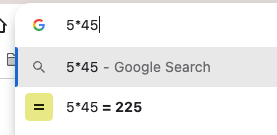
We discovered that you can disable this by ticking OFF the "Improve search suggestions", but this is a user setting we found for the logged in user.

I am curious if there is an Admin Control (which we haven't found yet) to disable this en masse? Thoughts?
---
Jeremy Bautista | CUSD 201 - Westmont, IL, USA | https://linktr.ee/jsb_tech
Jeremy Bautista | CUSD 201 - Westmont, IL, USA | https://linktr.ee/jsb_tech
Topics:
- Topics:
-
Chrome Management
1 REPLY 1

Options
- Mark as New
- Bookmark
- Subscribe
- Mute
- Subscribe to RSS Feed
- Permalink
- Report Inappropriate Content
11-10-2023 12:55 PM
If you don't find it among the settings when searching for it, then there isn't one.
--
https://wheretofind.me/@NoSubstitute
https://wheretofind.me/@NoSubstitute

Subscribe
