This website uses Cookies. Click Accept to agree to our website's cookie use as described in our Privacy Policy. Click Preferences to customize your cookie settings.

- The Google for Education Community Platform
- Primary and Secondary Education Communities
- ELP Admin Community
- Discussions
- Peer-Peer Topics
- strange additional profile issue
Options
- Subscribe to RSS Feed
- Mark Topic as New
- Mark Topic as Read
- Float this Topic for Current User
- Bookmark
- Subscribe
- Mute
- Printer Friendly Page
strange additional profile issue

Options
- Mark as New
- Bookmark
- Subscribe
- Mute
- Subscribe to RSS Feed
- Permalink
- Report Inappropriate Content
10-22-2024 07:09 AM
Hello. Get a load of this one.
Windows 11 Pro workstation, and Windows 11 Pro laptop. Both at version 23H2 (OS Build 22631.4317).
Both using Chrome browser version 130.0.6723.59 (Official Build) (64-bit).
I have two student "test" accounts I have created for use with my chromebook deployment. I have been using them on my student chromebooks for years to check settings and see what things look like signed in as a "student".
On my Windows workstation, in the chrome browser, I can add one of these test student accounts as an additional profile so I can switch back on and forth to test settings.
On my Windows laptop, in the chrome browser, I can initially add (login) to the same student account as an additional profile. However, when I close the chrome browser and re-open it, I get this message:
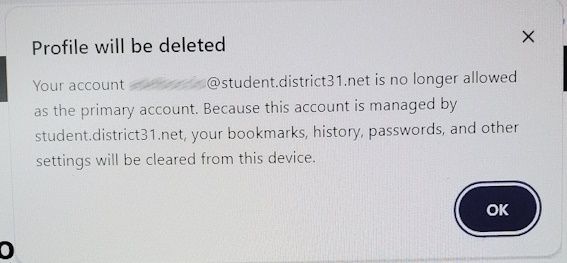
And the profile that I just successfully added is DELETED!
I have never seen this action before, and for the life of me cannot figure out why it works on one device (my workstation) but not the other (my laptop), even though they are both the same version of Windows and Chrome browser.
Topics:
- Topics:
-
Discussion
4 REPLIES 4
Options
- Mark as New
- Bookmark
- Subscribe
- Mute
- Subscribe to RSS Feed
- Permalink
- Report Inappropriate Content
10-22-2024 07:20 AM
update...........
OK, for some reason now the behavior is happening on BOTH devices.
So what admin settings do I have configured for my student accounts that might be triggering this action?
Is this possibly a "multiple login" setting?
Options
- Mark as New
- Bookmark
- Subscribe
- Mute
- Subscribe to RSS Feed
- Permalink
- Report Inappropriate Content
10-22-2024 09:05 AM
OK, looks like I'm answering my own question here.
This action was DEFINITELY being controlled by this admin setting:
https://admin.google.com/ac/chrome/settings/user/details/new_multiple_sign_in_access?
I rightly had my student test accounts (and student OU's) set to "block multiple sign in access for this organization".
So I made a SUB OU off of my normal student OU's called "allow multiple sign in" and changed this setting to "managed user must be primary, secondary users are allowed". Then moved my two student test accounts into this new OU.

Options
- Mark as New
- Bookmark
- Subscribe
- Mute
- Subscribe to RSS Feed
- Permalink
- Report Inappropriate Content
10-23-2024 03:43 AM
Ah, so you didn't have this restriction for your own account, but only for students?
--
https://wheretofind.me/@NoSubstitute
https://wheretofind.me/@NoSubstitute
Options
- Mark as New
- Bookmark
- Subscribe
- Mute
- Subscribe to RSS Feed
- Permalink
- Report Inappropriate Content
10-23-2024 04:37 AM
Correct. It was just interesting to see how this acted on a non-chromebook device.

