This website uses Cookies. Click Accept to agree to our website's cookie use as described in our Privacy Policy. Click Preferences to customize your cookie settings.

- The Google for Education Community Platform
- Primary and Secondary Education Communities
- ELP Admin Community
- Discussions
- Peer-Peer Topics
- Prevent right-mouse click on Google Form
Options
- Subscribe to RSS Feed
- Mark Topic as New
- Mark Topic as Read
- Float this Topic for Current User
- Bookmark
- Subscribe
- Mute
- Printer Friendly Page

Options
- Mark as New
- Bookmark
- Subscribe
- Mute
- Subscribe to RSS Feed
- Permalink
- Report Inappropriate Content
02-27-2025 07:44 AM
How do you prevent students from doing a Right-Mouse click inside a Google Form?
Solved! Go to Solution.
Topics:
- Topics:
-
Google Apps Manager (GAM)
1 ACCEPTED SOLUTION

Options
- Mark as New
- Bookmark
- Subscribe
- Mute
- Subscribe to RSS Feed
- Permalink
- Report Inappropriate Content
03-05-2025 07:05 AM - edited 03-05-2025 07:06 AM
Should be able to turn that off for the student OU here:
https://admin.google.com/ac/chrome/settings/user/details/quick_answers_enabled_category_item
or: Devices > Chrome > Settings > Users and browsers > User experience > Quick Answers
There are 3 extra options, perhaps translation is fine but just definition isn't, you can turn of parts of Quick Answers as well
Reply
14 REPLIES 14

Options
- Mark as New
- Bookmark
- Subscribe
- Mute
- Subscribe to RSS Feed
- Permalink
- Report Inappropriate Content
02-27-2025 07:49 AM
I'm not sure there is a way to accomplish this.
What is it that you are trying to achieve by preventing this?
Options
- Mark as New
- Bookmark
- Subscribe
- Mute
- Subscribe to RSS Feed
- Permalink
- Report Inappropriate Content
02-27-2025 08:00 AM
Students are taking a vocab test and right-clicking on the words to get the definition to appear (locking the Chromebooks doesn't solve this issue).
Options
- Mark as New
- Bookmark
- Subscribe
- Mute
- Subscribe to RSS Feed
- Permalink
- Report Inappropriate Content
02-27-2025 08:06 AM
So if this forms/quiz is done in secure mode, then right clicking on anything does not work from what I see.
Options
- Mark as New
- Bookmark
- Subscribe
- Mute
- Subscribe to RSS Feed
- Permalink
- Report Inappropriate Content
02-27-2025 08:07 AM
OK, technically you can right click, but all the options are greyed out...
Options
- Mark as New
- Bookmark
- Subscribe
- Mute
- Subscribe to RSS Feed
- Permalink
- Report Inappropriate Content
02-27-2025 09:17 AM - edited 02-27-2025 10:22 AM
Not on my end! Let me know if there is an Admin setting I need to do.
Options
- Mark as New
- Bookmark
- Subscribe
- Mute
- Subscribe to RSS Feed
- Permalink
- Report Inappropriate Content
02-27-2025 08:54 AM
They get a message that says "Right-click or press & hold to get definitions, translations, or unit conversations." They click "Try it" and then Bam - the definition is there. Why would Google allow us to make quizzes and then give the students that capability? LOL
Options
- Mark as New
- Bookmark
- Subscribe
- Mute
- Subscribe to RSS Feed
- Permalink
- Report Inappropriate Content
02-27-2025 09:32 AM

Options
- Mark as New
- Bookmark
- Subscribe
- Mute
- Subscribe to RSS Feed
- Permalink
- Report Inappropriate Content
02-27-2025 11:41 AM
That looks like you have a chrome extension doing that:
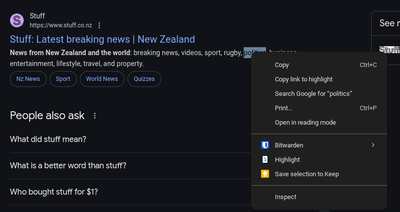
When I am in quiz mode, all of my options are greyed out and I do not have the "Define" option. Maybe that extension could add the Google Forms to the blocklist and not work on those URL's. Hard to say.
Options
- Mark as New
- Bookmark
- Subscribe
- Mute
- Subscribe to RSS Feed
- Permalink
- Report Inappropriate Content
02-27-2025 04:18 PM
Are you testing this on a Chromebook using a Google Form?
Options
- Mark as New
- Bookmark
- Subscribe
- Mute
- Subscribe to RSS Feed
- Permalink
- Report Inappropriate Content
02-28-2025 06:23 AM
I created a Google form and sent it to my coworker as a secure Quiz in the lockdown mode (on a ChromeBox).
My coworker was unable to click any options in the right click menu. But I did not see the define option he had shown in his screenshot. It's possible that this was disabled previously though I cannot recall seeing it before.
Options
- Mark as New
- Bookmark
- Subscribe
- Mute
- Subscribe to RSS Feed
- Permalink
- Report Inappropriate Content
02-28-2025 06:27 AM
So we all have it? It's not just my set up?
Options
- Mark as New
- Bookmark
- Subscribe
- Mute
- Subscribe to RSS Feed
- Permalink
- Report Inappropriate Content
02-27-2025 12:30 PM - edited 02-27-2025 12:38 PM
I found out it's called "Quick Answers" https://support.google.com/chrome/a/answer/13616580?hl=en
I need to find out how to turn that off. The student's initial screen looks like this:

Options
- Mark as New
- Bookmark
- Subscribe
- Mute
- Subscribe to RSS Feed
- Permalink
- Report Inappropriate Content
03-05-2025 07:05 AM - edited 03-05-2025 07:06 AM
Should be able to turn that off for the student OU here:
https://admin.google.com/ac/chrome/settings/user/details/quick_answers_enabled_category_item
or: Devices > Chrome > Settings > Users and browsers > User experience > Quick Answers
There are 3 extra options, perhaps translation is fine but just definition isn't, you can turn of parts of Quick Answers as well
Reply
Options
- Mark as New
- Bookmark
- Subscribe
- Mute
- Subscribe to RSS Feed
- Permalink
- Report Inappropriate Content
03-10-2025 09:30 AM
Thank you!

