This website uses Cookies. Click Accept to agree to our website's cookie use as described in our Privacy Policy. Click Preferences to customize your cookie settings.

- The Google for Education Community Platform
- Primary and Secondary Education Communities
- ELP Admin Community
- Discussions
- Peer-Peer Topics
- Google Drive App: "Your organization doesn't allow...
Options
- Subscribe to RSS Feed
- Mark Topic as New
- Mark Topic as Read
- Float this Topic for Current User
- Bookmark
- Subscribe
- Mute
- Printer Friendly Page
Google Drive App: "Your organization doesn't allow Drive for Desktop to be used with..."

Options
- Mark as New
- Bookmark
- Subscribe
- Mute
- Subscribe to RSS Feed
- Permalink
- Report Inappropriate Content
07-16-2025 10:38 AM
We just encountered an issue where:
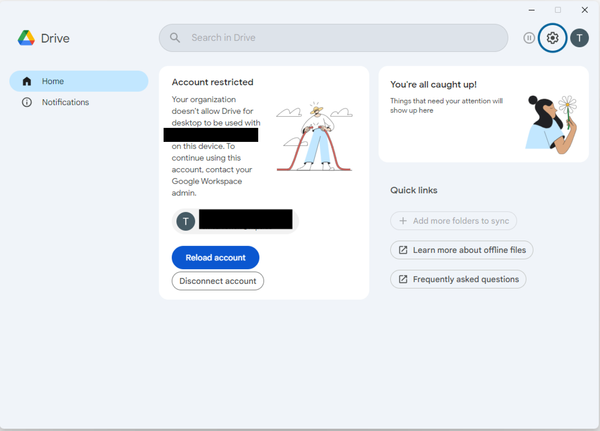
We use the Google Drive app for Windows and users were receiving a notice that "Your organization doesn't allow Drive for Desktop to be used with ACCOUNT on this device."
When we look in the Admin Console per this article we found that the setting "Only allow Google Drive for desktop on authorized devices" was enabled.
After we disabled this setting it we searched the Admin log events audit log and found no prior reference to Setting name DriveFsSettingsProto drive_fs_enabled being modified.
Hope everyone is having a good summer! 🏖️

Topics:
- Topics:
-
Google Workspace
Reply
6 REPLIES 6

Options
- Mark as New
- Bookmark
- Subscribe
- Mute
- Subscribe to RSS Feed
- Permalink
- Report Inappropriate Content
07-16-2025 10:45 AM
You have likely enabled Company Owned devices and Device Approvals in Devices > Mobile & Endpoints
Options
- Mark as New
- Bookmark
- Subscribe
- Mute
- Subscribe to RSS Feed
- Permalink
- Report Inappropriate Content
07-16-2025 11:04 AM

Options
- Mark as New
- Bookmark
- Subscribe
- Mute
- Subscribe to RSS Feed
- Permalink
- Report Inappropriate Content
07-16-2025 11:42 AM
I am also working with this...
Options
- Mark as New
- Bookmark
- Subscribe
- Mute
- Subscribe to RSS Feed
- Permalink
- Report Inappropriate Content
07-16-2025 11:44 AM
Changing the setting back worked for us, just took 15-30 minutes to apply. We asked affected users to reboot and then they are working as expected again.
Reply
Options
- Mark as New
- Bookmark
- Subscribe
- Mute
- Subscribe to RSS Feed
- Permalink
- Report Inappropriate Content
07-16-2025 12:07 PM
@Bill_Gibson , we did the same thing and it got us back up and running. Not sure what that was about.
Options
- Mark as New
- Bookmark
- Subscribe
- Mute
- Subscribe to RSS Feed
- Permalink
- Report Inappropriate Content
07-16-2025 01:20 PM

Subscribe
Related Content
- Trust Rules - External sites.google.com Access in Peer-Peer Topics
- Can't use recently purchased ChromeOS Education Upgrades in Peer-Peer Topics
- Chromebook changes preventing College google account login? in Peer-Peer Topics
- [Action Advised] Google Vids personal avatar feature and Admin control in Peer-Peer Topics
- Best tool for who is logging into what Chromebook? in Peer-Peer Topics
