This website uses Cookies. Click Accept to agree to our website's cookie use as described in our Privacy Policy. Click Preferences to customize your cookie settings.

- The Google for Education Community Platform
- Primary and Secondary Education Communities
- ELP Admin Community
- Discussions
- Peer-Peer Topics
- User is sending an email but it's from a username@...
Options
- Subscribe to RSS Feed
- Mark Topic as New
- Mark Topic as Read
- Float this Topic for Current User
- Bookmark
- Subscribe
- Mute
- Printer Friendly Page
User is sending an email but it's from a [email protected] donotreply

Options
- Mark as New
- Bookmark
- Subscribe
- Mute
- Subscribe to RSS Feed
- Permalink
- Report Inappropriate Content
05-29-2024 12:59 PM
First I've seen something like this.
A user is sending an email to someone, and the person receiving it cannot reply because the email address it's coming from appears to be a donotreply address. I've looked at their Google account where I can (update user, user information, etc.) but cannot find where this donotreply is coming from, nor why a recipient cannot reply. My next step is having them send me an email and then seeing if I can/cannot reply. Perhaps it's just a visual thing (strange and need to resolve it) and I can still reply, or perhaps it truly cannot be replied to..
Thought I'd check here to at a minimum clear up the donotreply portion.
Vault:
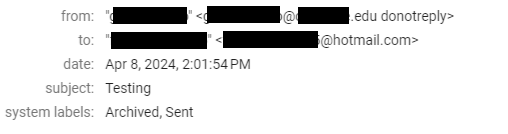
Screenshot from user's phone it appears.
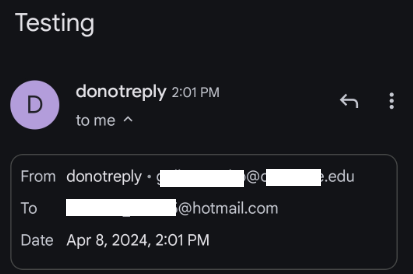
Solved! Go to Solution.
Topics:
- Topics:
-
Google Workspace
1 ACCEPTED SOLUTION

Options
- Mark as New
- Bookmark
- Subscribe
- Mute
- Subscribe to RSS Feed
- Permalink
- Report Inappropriate Content
05-29-2024 02:11 PM
There are two places that this can be changed. The first one is in the GAC and you've already verified that the name is correct. The other is on the users Gmail account. (see steps below) Is it possible the enduser changed it there?
- Log in to your Gmail account.
- Click the Settings button in the upper right corner.
- Click on See all settings.
- Select the Accounts.
- Look for Send Mail As and click edit info next to your email address.
- In the pop-up window, update the name to your business name instead.
- Click on Save changes.
12 REPLIES 12
Options
- Mark as New
- Bookmark
- Subscribe
- Mute
- Subscribe to RSS Feed
- Permalink
- Report Inappropriate Content
05-29-2024 01:05 PM
Is the user sending this directly from the Gmail app or website or are they using a third-party app such as their SIS or LMS? Out SIS, for example, can send email from a donotreply@ as a default if the teacher does not use their account linked to the SIS to send the batch email.
Reply
Options
- Mark as New
- Bookmark
- Subscribe
- Mute
- Subscribe to RSS Feed
- Permalink
- Report Inappropriate Content
05-29-2024 01:10 PM - edited 05-29-2024 01:11 PM
It would appear from the gmail app on their android based on their screenshot. I delegated access to myself and sent an email and it came in with the following. I do not see anything out of the ordinary in the Directory either.
I delegated access and sent an email and received the following.
I have yet to respond because I only got authorization from my manager to delegate access to myself, not the user, so I don't want to freak them out by responding to an email they didn't send lol. I will wait for them to send me an email as themselves and then I will reply.

Options
- Mark as New
- Bookmark
- Subscribe
- Mute
- Subscribe to RSS Feed
- Permalink
- Report Inappropriate Content
05-29-2024 01:25 PM
Is donotreply@ listed as a user in your Google Admin Console? If you search by donotreply does it list an account?
Options
- Mark as New
- Bookmark
- Subscribe
- Mute
- Subscribe to RSS Feed
- Permalink
- Report Inappropriate Content
05-29-2024 01:28 PM
Options
- Mark as New
- Bookmark
- Subscribe
- Mute
- Subscribe to RSS Feed
- Permalink
- Report Inappropriate Content
05-29-2024 01:31 PM
I've also asked them to go to their Name setting in myaccount (https://myaccount.google.com/profile/name) to see if it shows the donotreply.
Options
- Mark as New
- Bookmark
- Subscribe
- Mute
- Subscribe to RSS Feed
- Permalink
- Report Inappropriate Content
05-29-2024 01:34 PM
Options
- Mark as New
- Bookmark
- Subscribe
- Mute
- Subscribe to RSS Feed
- Permalink
- Report Inappropriate Content
05-29-2024 01:40 PM

Reply
Options
- Mark as New
- Bookmark
- Subscribe
- Mute
- Subscribe to RSS Feed
- Permalink
- Report Inappropriate Content
05-29-2024 02:11 PM
There are two places that this can be changed. The first one is in the GAC and you've already verified that the name is correct. The other is on the users Gmail account. (see steps below) Is it possible the enduser changed it there?
- Log in to your Gmail account.
- Click the Settings button in the upper right corner.
- Click on See all settings.
- Select the Accounts.
- Look for Send Mail As and click edit info next to your email address.
- In the pop-up window, update the name to your business name instead.
- Click on Save changes.
Options
- Mark as New
- Bookmark
- Subscribe
- Mute
- Subscribe to RSS Feed
- Permalink
- Report Inappropriate Content
05-29-2024 03:21 PM

Options
- Mark as New
- Bookmark
- Subscribe
- Mute
- Subscribe to RSS Feed
- Permalink
- Report Inappropriate Content
05-31-2024 03:12 AM
Yeah, remove all SendAs. Rarely a need for such.
--
https://wheretofind.me/@NoSubstitute
https://wheretofind.me/@NoSubstitute

Options
- Mark as New
- Bookmark
- Subscribe
- Mute
- Subscribe to RSS Feed
- Permalink
- Report Inappropriate Content
05-30-2024 01:54 AM
From the image the email address appears to start with 'g', so it is not a do not reply email address. It suggests that it is just the name of the account is "do not reply". Your email logs can verify this assumption by looking at the logs for the email above with subject 'testing 3'.
Are they using a mail client - if so check the name of the account settings. If this also happens in the gmail client check the account tab in the gmail settings to see if there ianying set there especially in the "Send mail as" section.
Options
- Mark as New
- Bookmark
- Subscribe
- Mute
- Subscribe to RSS Feed
- Permalink
- Report Inappropriate Content
05-30-2024 06:08 AM
I believe it's the name in their Send As setting. Gam shows "displayname" as "donotreply" when running "gam user username print sendas"
So I'm thinking the user has to go into their settings as mentioned and change their Send As. The user stated they went through the steps to get their and confirmed that the name shows properly (their name, not the donotreply) so I'm going to have to either meet with them/Zoom, or change their password and login as them
Reply

Subscribe
Related Content
- DLP - or equivalent alerting/blocking in Peer-Peer Topics
- Anyone else having intermittent gmail sending error messages? in Peer-Peer Topics
- Apps/Extensions Timeline in Peer-Peer Topics
- API controls, Trust internal apps and Apps Script in Peer-Peer Topics
- Third party IP in our SMTP Relay config in Peer-Peer Topics
