This website uses Cookies. Click Accept to agree to our website's cookie use as described in our Privacy Policy. Click Preferences to customize your cookie settings.

- The Google for Education Community Platform
- Primary and Secondary Education Communities
- ELP Admin Community
- Discussions
- Peer-Peer Topics
- Too good not to share- Even if you block external ...
Options
- Subscribe to RSS Feed
- Mark Topic as New
- Mark Topic as Read
- Float this Topic for Current User
- Bookmark
- Subscribe
- Mute
- Printer Friendly Page
Too good not to share- Even if you block external sharing of docs for students

Options
- Mark as New
- Bookmark
- Subscribe
- Mute
- Subscribe to RSS Feed
- Permalink
- Report Inappropriate Content
12-07-2023 01:31 PM
I got this from another post
If these students would spend even a sliver of the time they spend getting around my settings on actual school work, they would graduate early.
Here is what they have done (and shared with others how to do). Note - we have students in a walled garden where they cannot share outside the district AND the students are limited to sharing within their school OU of students.
Here is their work around to reach students at the other school AND to chat with users outside the district.
- Create a new Drive file. They used Docs but would work with others.
- Pick a staff member that they believe doesn't spend a lot of time in their Google account - custodians tend to appear the go to here.
- Share that file with that often-inactive user and make them an editor. Do not notify.
- Now, make that often-inactive user the OWNER of the file. Yes, they get notified but if they are often inactive and only check email on their phones and have notifications off, that often non-active employee never sees that email.
- Now the file the student initially created is outside the walled-garden because it is owned by a staff member. As an editor on the file, the student can share it with whomever they wish - students at our other school or anyone out in the real world.
Should also mention that in Google classroom when a document is turned in by students, the teacher becomes the owner.
Other than trying to set up an alert for a Gmail Log event for an email containing the subject "You're now the owner of," do y'all have any suggestions for how I can close this gapping hole?
Topics:
- Topics:
-
Discussion
Reply
9 REPLIES 9

Options
- Mark as New
- Bookmark
- Subscribe
- Mute
- Subscribe to RSS Feed
- Permalink
- Report Inappropriate Content
12-07-2023 02:07 PM
In my opinion, Google could probably fix this issue pretty easily by doing one or both of these:
On step 3, On user shares, only make the change take effect when the user accepts the share, or on step 4, only admins can change ownership without the user accepting ownership. Maybe have a mass approval button when someone wants to share or transfer a lot of files with one individual? Of the two, I think the transfer of ownership would probably be the most important. Having Google Admins or Security groups that could do these tasks without having to have users approve might be helpful (staff?)
- Now, make that often-inactive user the OWNER of the file
Reply

Options
- Mark as New
- Bookmark
- Subscribe
- Mute
- Subscribe to RSS Feed
- Permalink
- Report Inappropriate Content
12-08-2023 12:14 AM
Having the option of restricting transfer of ownership without notification is a very good idea.
Admin setting applicable to both OUs and Groups, of course. Absolutely not a forced change.
--
https://wheretofind.me/@NoSubstitute
https://wheretofind.me/@NoSubstitute
Reply

Options
- Mark as New
- Bookmark
- Subscribe
- Mute
- Subscribe to RSS Feed
- Permalink
- Report Inappropriate Content
12-07-2023 11:17 PM
Oh........😬.
This could prove very problematic!
Options
- Mark as New
- Bookmark
- Subscribe
- Mute
- Subscribe to RSS Feed
- Permalink
- Report Inappropriate Content
12-08-2023 12:14 AM
Well, this has always been the way it worked.
--
https://wheretofind.me/@NoSubstitute
https://wheretofind.me/@NoSubstitute
Options
- Mark as New
- Bookmark
- Subscribe
- Mute
- Subscribe to RSS Feed
- Permalink
- Report Inappropriate Content
12-08-2023 12:12 AM
Files turned in in Classroom can't be used for this, as the student loses Edit access, and thereby can't share the file.
--
https://wheretofind.me/@NoSubstitute
https://wheretofind.me/@NoSubstitute
Reply
Options
- Mark as New
- Bookmark
- Subscribe
- Mute
- Subscribe to RSS Feed
- Permalink
- Report Inappropriate Content
12-08-2023 12:35 AM
You can easily set up an Activity Rule in Drive Log Events in Investigation Tool, but, sadly, that will alert you of all submissions in Classroom.

But, if you then exclude Visibility = Shared Externally (yes, it's stupid that Classroom submissions are categorised as external shares, but it's because the Classroom groups aren't internally accessible), you will not get alerts for those actions.
Next, you have to exclude your Originality Report Actor, as those shares are also irrelevant.
I thought that you could skip transfers to Shared Drives, by excluding SharedDriveIDs with a 0 (they all begin with a 0, so far), because, if students have access to Shared Drives, and the SD is allowed to share externally, then they can also use an SD as an intermediate, but you can't add that as a negative requirement, as it will skip all events not transferring to an SD. Hmmm....
Hah, I figured it out!
You can skip transfers to SDs by requiring the New Owner to include your domain name.
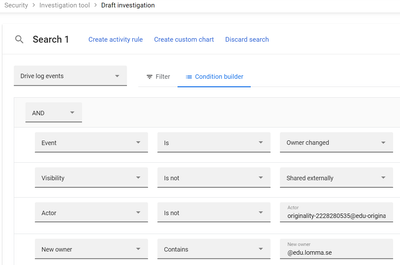
And if you want a list of only transfers to SDs, you reverse the logic of New Owner.
--
https://wheretofind.me/@NoSubstitute
https://wheretofind.me/@NoSubstitute
Reply
Options
- Mark as New
- Bookmark
- Subscribe
- Mute
- Subscribe to RSS Feed
- Permalink
- Report Inappropriate Content
12-08-2023 12:37 AM - edited 12-08-2023 12:39 AM
Aaaaaand... If you only want alerts when students do it.. add an extra attribute referencing the /Students OU. 😎

Yes, I too find it odd that the operator Is actually works as Contains here, because I definitely don't have any students in the root of my students OU.
--
https://wheretofind.me/@NoSubstitute
https://wheretofind.me/@NoSubstitute
Options
- Mark as New
- Bookmark
- Subscribe
- Mute
- Subscribe to RSS Feed
- Permalink
- Report Inappropriate Content
12-08-2023 05:43 AM - edited 12-08-2023 05:46 AM
No one says they can't find out that a student has done this. They are just saying you are chasing an endless battle. Tell me an admin that would do this, I woud tell you an admin that has too much free time.? It was even mentioned a gmail log event on ownership
Reply

Options
- Mark as New
- Bookmark
- Subscribe
- Mute
- Subscribe to RSS Feed
- Permalink
- Report Inappropriate Content
12-08-2023 09:59 AM
Occurs to me that this might also be a workaround for quota limitations (e.g., take your large pirated videos and change their ownership to someone else). Sigh.
Reply

Subscribe
Related Content
- Trust Rules - External sites.google.com Access in Peer-Peer Topics
- How do you share a Workspace NotebookLM with hundreds of users? in Peer-Peer Topics
- Sharing Gems with Students in Peer-Peer Topics
- External Drive file shares and security in Peer-Peer Topics
- Drive file permissions and audit check in Peer-Peer Topics
