This website uses Cookies. Click Accept to agree to our website's cookie use as described in our Privacy Policy. Click Preferences to customize your cookie settings.

Options
- Subscribe to RSS Feed
- Mark Topic as New
- Mark Topic as Read
- Float this Topic for Current User
- Bookmark
- Subscribe
- Mute
- Printer Friendly Page

Options
- Mark as New
- Bookmark
- Subscribe
- Mute
- Subscribe to RSS Feed
- Permalink
- Report Inappropriate Content
04-22-2025 06:45 AM
We have instances of deadnames coming back when we use GCDS. We're wondering how we can sync the following properly so that the persons deadname does not come back while using GCDS to sync attributes:
- first name (ad=givenName)
- last name (ad=sn)
- display name (ad=displayName)
The user in question, lets say their legal and preferred names are as follows (our policy allows preferred name over legal name for systems)
- legal first name = Jane
- legal last name = Doe
- preferred first name = Bocco
- preferred last name = Doe
- givenName in ad reflects "Jane"
- sn in ad reflects "Doe"
- displayName in ad reflects "Bocco Doe"
When we use GCDS to sync the above information and attributes, their Google names get overwritten from "Bocco Doe" to "Jane Doe".
I ran gam info user <username> and there are three attributes related to name: First Name, Last Name, Full Name.
We want to be able to use GCDS and have it honor the values within AD to be reflected in Google. It would appear that regardless of what AD is presenting for displayName (which I presume is associated with Full Name), Google is just taking the First and Last name and making that their Full Name, which is the persons deadname.
Any insight or help anyone could shine some light on?
Solved! Go to Solution.
Topics:
- Topics:
-
Other
-
User Management
1 ACCEPTED SOLUTION

Options
- Mark as New
- Bookmark
- Subscribe
- Mute
- Subscribe to RSS Feed
- Permalink
- Report Inappropriate Content
04-27-2025 09:57 PM
See documentation here: https://developers.google.com/workspace/admin/directory/reference/rest/v1/users#UserName.FIELDS.full...
The 'Full Name' is simply the concatenation of the first and last names.
There appears to be support for a displayName field but I have not seen how that is set or viewed in the Google Admin Console. Or how it is used.
7 REPLIES 7
Options
- Mark as New
- Bookmark
- Subscribe
- Mute
- Subscribe to RSS Feed
- Permalink
- Report Inappropriate Content
04-27-2025 09:57 PM
See documentation here: https://developers.google.com/workspace/admin/directory/reference/rest/v1/users#UserName.FIELDS.full...
The 'Full Name' is simply the concatenation of the first and last names.
There appears to be support for a displayName field but I have not seen how that is set or viewed in the Google Admin Console. Or how it is used.
Options
- Mark as New
- Bookmark
- Subscribe
- Mute
- Subscribe to RSS Feed
- Permalink
- Report Inappropriate Content
04-28-2025 06:23 AM
Thank you for that information. I'll probably open a Google support case for GCDS in that case, as our recent experience is that GCDS is not honoring the displayName attribute from AD and ingesting that into Google. It overwrites their first name in Google which is fine if the displayName was honored as how the name should present.
Options
- Mark as New
- Bookmark
- Subscribe
- Mute
- Subscribe to RSS Feed
- Permalink
- Report Inappropriate Content
04-28-2025 03:08 PM
Please share what you learn from support. I am curious to understand what the expected behaviour is for the display name attribute.
Options
- Mark as New
- Bookmark
- Subscribe
- Mute
- Subscribe to RSS Feed
- Permalink
- Report Inappropriate Content
04-29-2025 06:22 AM
This is what they came back with. I'm not sure it necessarily answers my question as to why the user is being renamed to their deadname when we sync GCDS as even support states it should work.. will do some further testing..
Thank you for contacting Google Workspace Support. My name is <name> from the Migration and Sync team. I have taken ownership of the case, and I will be working along with you to get the issue sorted.
I understand you're experiencing issues with the GCDS tool, specifically that it's not honoring the displayName attribute from Active Directory when syncing to Google.
Please note that in the Google Admin console, only the user's first and last names are displayed together as the username. The displayName attribute is not reflected in the Admin console interface.
To view the displayName, I recommend checking the user's profile in Google Contacts, where this information is typically shown if synced correctly.

Options
- Mark as New
- Bookmark
- Subscribe
- Mute
- Subscribe to RSS Feed
- Permalink
- Report Inappropriate Content
05-06-2025 06:09 AM
That sounds like a perfectly valid explanation, saying that in the admin console, you don't ever see the displayName value, you see Full Name.
Because, displayName and Full Name are not the same thing.
The API documentation says that the Full Name value is read only.
https://developers.google.com/workspace/admin/directory/reference/rest/v1/users#UserName
Testing with GAM.
$ gam user kim print fields name
primaryEmail,name.givenName,name.familyName,name.fullName,name.displayName
kim@mydomain,Kim,Nilsson,Kim Nilsson,

$ gam update user kim displayName "Super Cool Dude"
User: kim@mydomain, Updated

$ gam user kim print fields name
primaryEmail,name.givenName,name.familyName,name.fullName,name.displayName
kim@mydomain,Kim,Nilsson,Kim Nilsson,Super Cool Dude

$ gam update user kim fullName "Really Nice Guy"
Command: /home/kim/bin/gam7/gam update user kim >>>fullName<<< "Really Nice Guy"

ERROR: Invalid argument
Note that I initially don't have a displayName value, because it's not a default thing.
It does work, though!
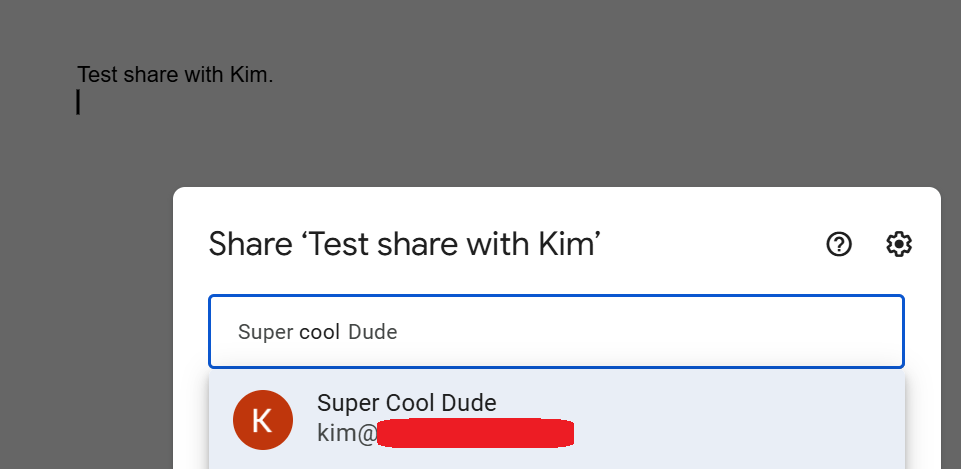
In the Investigation Tool / Admin log events, I can also see that's exactly what happened, but I can't see that displayName anywhere in the admin console.

So, you should just let GCDS do it's job, and the preferred name should be visible in the directory and Workspace services.
Do note that you will have to clear out the old contact for all users, as a contact overrides any information from the Directory.
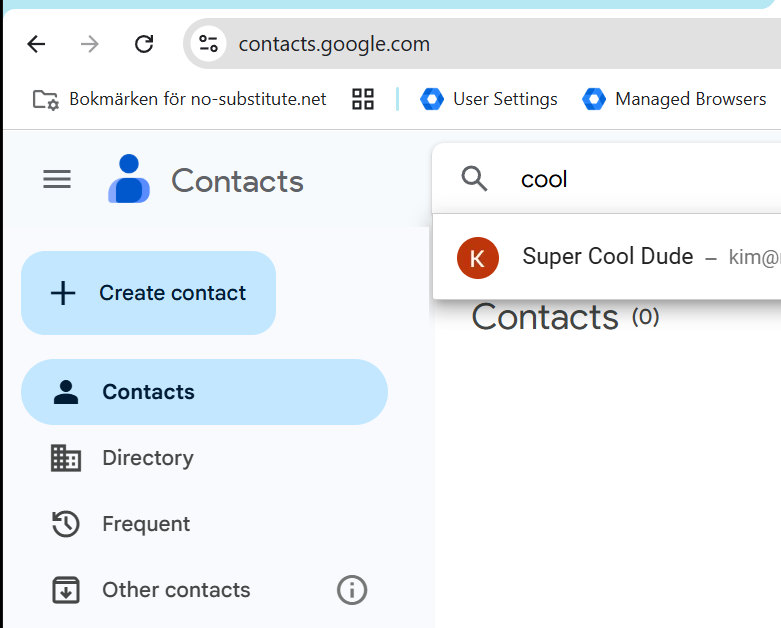
Here's the GAM wiki on how to do that.
You have to do it twice.
Once from My Contacts.
https://github.com/GAM-team/GAM/wiki/Users-People-Contacts-Profiles#example
Once from Other Contacts.
https://github.com/GAM-team/GAM/wiki/Users-People-Contacts-Profiles#delete-user-other-contacts
--
https://wheretofind.me/@NoSubstitute
https://wheretofind.me/@NoSubstitute
Options
- Mark as New
- Bookmark
- Subscribe
- Mute
- Subscribe to RSS Feed
- Permalink
- Report Inappropriate Content
05-06-2025 06:28 AM
Thanks Kim for the thorough explanation. I think 1) there was confusion/unknown on my part and 2) the end-user wasn't explaining well what they were seeing or where.
One interesting thing, is that Google recommends the Directory to "prove" the displayname is presenting properly. However, for one of the two cases in our situation, the first person that brought this issue to us is reflecting in the Directory accurately with their displayname, but the second person is still presenting the Full Name until you click on the contact record and it brings you to their contact card which displays the displayname as expected. I'm not sure if it's a 24hr and wait thing, but just something of an observation.
Options
- Mark as New
- Bookmark
- Subscribe
- Mute
- Subscribe to RSS Feed
- Permalink
- Report Inappropriate Content
05-06-2025 06:11 AM - edited 05-06-2025 06:12 AM
tl;dr
The user isn't renamed.
Full name can't be edited/set. It's always a combination of first and last name.
displayName is a different attribute, not visible in admin console.
displayName is visible everywhere else, instead of Full Name.
--
https://wheretofind.me/@NoSubstitute
https://wheretofind.me/@NoSubstitute

Subscribe
Related Content
- Gemini Enterprise now appearing.. in Peer-Peer Topics
- Secondary calendars will be deleted when their dataOwner's user account is deleted! in Peer-Peer Topics
- Limit 3rd Party Google Meet Bot Participants in Peer-Peer Topics
- Crowdsourcing Webinar Topics in Peer-Peer Topics
- Calendars and Google Classroom in Peer-Peer Topics
