This website uses Cookies. Click Accept to agree to our website's cookie use as described in our Privacy Policy. Click Preferences to customize your cookie settings.

- The Google for Education Community Platform
- Primary and Secondary Education Communities
- ELP Admin Community
- Discussions
- Peer-Peer Topics
- Cast Moderator - Remove Cast Destinations from Chr...
Options
- Subscribe to RSS Feed
- Mark Topic as New
- Mark Topic as Read
- Float this Topic for Current User
- Bookmark
- Subscribe
- Mute
- Printer Friendly Page
Cast Moderator - Remove Cast Destinations from ChromeOS list?

Options
- Mark as New
- Bookmark
- Subscribe
- Mute
- Subscribe to RSS Feed
- Permalink
- Report Inappropriate Content
08-21-2024 07:50 AM
We've recently started using Cast Moderator in classrooms and conference rooms.
In the Admin Console, we set a policy to require students to use a code every time they connect, to ensure that they can't cast without permission or physical presence in the room.
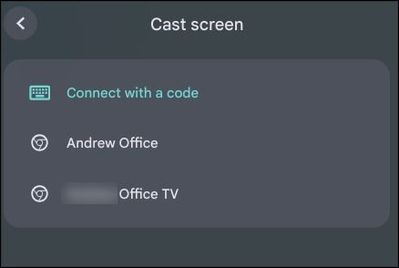
For staff, we set the cast destinations to remain for 1 year in order to minimize the chance that the staff would need to stop and enter a code.
From time to time, staff will temporarily present in a different room or conference room. Unfortunately this seems to clutter up their saved cast destinations. We'd like to manually remove those temporary cast destinations from their lists, but haven't found a way, other than completely removing the user's profile from the device.
I am hoping we are overlooking a simple 'delete' option. Otherwise, we'll reduce the "AccessCodeCastDeviceDuration" policy to 1 month. Even having 1 week would be a nice option.
Topics:
- Topics:
-
Chrome Management
-
Devices
1 REPLY 1

Options
- Mark as New
- Bookmark
- Subscribe
- Mute
- Subscribe to RSS Feed
- Permalink
- Report Inappropriate Content
08-26-2024 10:48 AM
Hi Andrew,
I have ours set to one-month. It is a small pain for the teachers to put the code in once a month, but it keeps their list clean on a regular basis. I feel like one-month is a nice middle point between desirable and undesirable functions.
Steven Harmon | EdTech Specialist

Subscribe
