This website uses Cookies. Click Accept to agree to our website's cookie use as described in our Privacy Policy. Click Preferences to customize your cookie settings.

- The Google for Education Community Platform
- Primary and Secondary Education Communities
- Global Google Educator Group
- Gemini Space
- Re: Big News Shaking Up the Industry! Say Goodbye ...
Options
- Subscribe to RSS Feed
- Mark Topic as New
- Mark Topic as Read
- Float this Topic for Current User
- Bookmark
- Subscribe
- Mute
- Printer Friendly Page
Big News Shaking Up the Industry! Say Goodbye to Traditional Image Editing as "Google Pics"

Options
- Mark as New
- Bookmark
- Subscribe
- Mute
- Subscribe to RSS Feed
- Permalink
- Report Inappropriate Content
a week ago
🚨 Big News Shaking Up the Industry! Say Goodbye to Traditional Image Editing as "Google Pics" Brings Pro-Level AI to Google Workspace! 🎨✨
Hello everyone! Today, I have some truly "exciting" news to share! Anyone who struggles with finding illustrations, creating slides, or editing photos needs to hear this right now. Google has just launched a new feature called "Google Pics" that will revolutionize image creation and editing with pro-level AI—made super easy. Plus, you can use it directly within your everyday Google Workspace workflow!

What is Google Pics and Why is it Awesome? 🤩 Imagine just typing a text prompt telling the AI what kind of image you want, and Google's best AI image model conjures it up instantly. Or, if you already have a photo, simply import it from your computer, Google Drive, or Google Photos to edit it further with AI. The coolest part is that it comes packed with advanced AI tools, such as:
Create or refine images with text: Pics offers a variety of image options to ensure you always get the perfect shot.
Precise, pinpoint editing: Just hover and select specific parts of an image for highly accurate, localized edits.
Manage text within images: You can edit, format, or even "translate" individual text elements right inside the picture!
Crop and upscale images: Crop your images for the web, social media, or digital print.
Seamless integration in your current apps: Working on Google Docs or Slides? With a single click on an image, you can edit it using Pics' AI tool suite without ever switching apps or tabs!
Collaboration and version history: The system saves your edit history, so you can always revert to a previous version to undo changes. You can also invite teammates to collaborate or share images via a link, just like other Workspace apps.
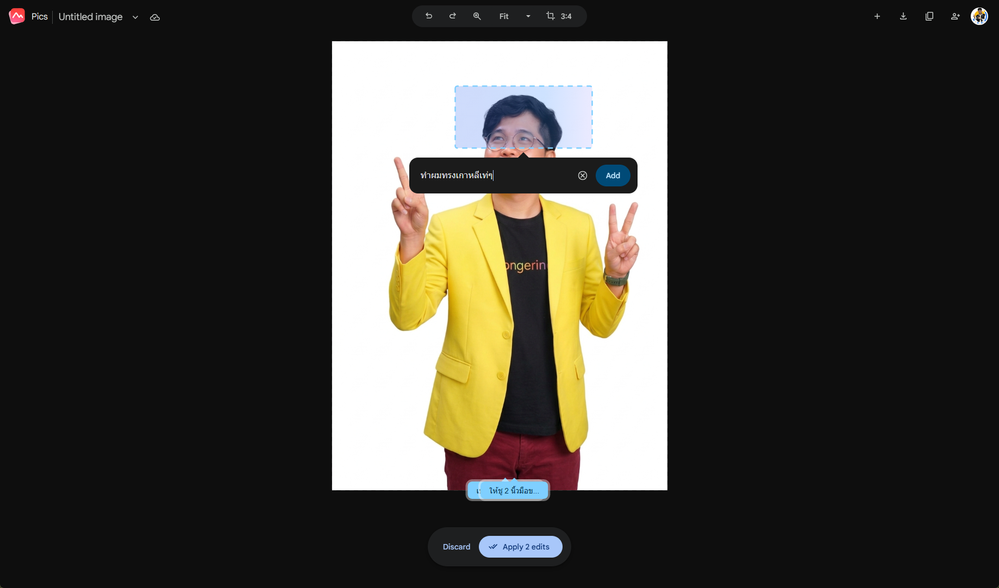

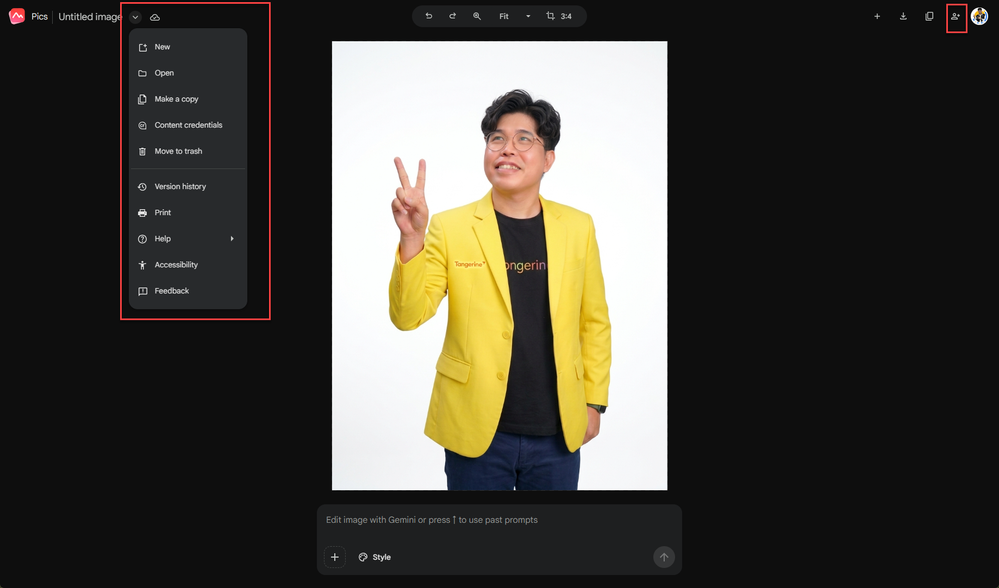
💡 Transforming Education: How Can Students and Teachers Apply This? Of course, this feature is available for the education sector through the Google AI Pro for Education add-on. Let's see how it can make classrooms more fun and save a ton of time!
🎓 For Students: Unlock Imagination and Ace Your Reports
No more struggling to find the right image: When making presentations on Slides, students can simply type a prompt to generate AI images that perfectly match their report's content.
Group work is more fun: With features supporting real-time collaboration and link sharing, group members can jump in to help edit and tweak project images together.
👩🏫 For Teachers: Pro-Level Teaching Materials to Wow the Class
Make learning materials visually engaging: Teachers can create fresh illustrations or upscale older visuals to 2K or 4K, making presentations beautiful and captivating on the big screen.
Instant translation on teaching materials: This is a game-changer! If a teacher has a diagram or infographic in a foreign language, they can use the feature to translate the text directly on the image, helping students understand instantly without having to redesign the graphic.
Faster lesson prep: Teachers can click on images in Google Docs or Slides and use Google Pics' tools to tweak their materials right there, no extra tabs needed.
Bottom Line 🚀 I can confidently say that "Google Pics" will become an essential assistant, making both learning and teaching much more vibrant and seamless! Having pro-level AI at your fingertips and being able to edit images straight from Google Drive with a single click really opens up endless ideas and saves a massive amount of time.
What about you? How do you plan to use Google Pics? Drop a comment and share your ideas below! 👇
wirut khajonchai
Topics:
- Topics:
-
Gemini
-
Google Workspace for Education
6 REPLIES 6

Options
- Mark as New
- Bookmark
- Subscribe
- Mute
- Subscribe to RSS Feed
- Permalink
- Report Inappropriate Content
Sunday
As a former educator and a longtime photojournalist, this gives me pause. Documentary imagery should not be grist for generative AI. Decorative images should not be able to be mistaken for genuine photographs. This sort of tool should not be put in front of either staff or students without careful ethical training.
Options
- Mark as New
- Bookmark
- Subscribe
- Mute
- Subscribe to RSS Feed
- Permalink
- Report Inappropriate Content
Sunday
Thank you for your interesting feedback and perspective, MarkJLoundy.
I understand and agree with the concerns you've raised, which are very important issues as AI plays an increasingly significant role today.
The matter of ethics and distinguishing between real photographs and AI-generated images is crucial.
wirut khajonchai

Options
- Mark as New
- Bookmark
- Subscribe
- Mute
- Subscribe to RSS Feed
- Permalink
- Report Inappropriate Content
Monday
This is awesome! Just started testing it out.
Options
- Mark as New
- Bookmark
- Subscribe
- Mute
- Subscribe to RSS Feed
- Permalink
- Report Inappropriate Content
Monday
Adding: This is only on for those with an AI pro license, so there are only a few in our district who even have access.
Options
- Mark as New
- Bookmark
- Subscribe
- Mute
- Subscribe to RSS Feed
- Permalink
- Report Inappropriate Content
Monday
Thanks for sharing the additional information. It's very helpful to know that access to this feature is still limited. If there are any more updates, please keep us posted.
wirut khajonchai

Options
- Mark as New
- Bookmark
- Subscribe
- Mute
- Subscribe to RSS Feed
- Permalink
- Report Inappropriate Content
Tuesday
如果確保沒有亂碼或生成其他奇怪的圖像,這項功能都可以幫助到圖片編輯使用者。但我同意要教導大家使用的規範

Subscribe
Related Content
- Beyond Borders: Cultivating Teacher-Led Mentorship and Digital Peer Observation in News & Announcements
- Big News Shaking Up the Industry! Say Goodbye to Traditional Image Editing as "Google Pics" in Gemini Space
- Global GEG Event Recap | Navigating Digital Texts: Scaffolding AI Literacy and Information Fluency in News & Announcements
- Beyond Passive Consumption: Cultivating Critical Fluency and Deliberate Composition in News & Announcements
- AI in Education: Aligning Ohio's Model Policy and Technology Standards with GES in News & Announcements
